
Acheck
Area Closure Checking for Land Surveyors
Check, close, and report parcel boundaries right inside AutoCAD® and Civil 3D® — bearings or azimuths, imperial or metric. Built from 35 years of Ontario land survey drafting experience.
Inside AutoCAD & Civil 3D 2023–2027 · or on its own, on any PC
Three editions. Acheck for AutoCAD is a plugin that runs inside AutoCAD and Civil 3D — $300 once. Acheck Desktop + Online is a Windows program plus the browser version, for a PC with no AutoCAD on it — $300 a year. Acheck Online credits are the browser version, paid by the check.
Acheck for AutoCAD
Acheck Desktop + Online
Try it online for free →
Acheck Online credits
Just one parcel to check? →
See it work
Type the courses off the plan. Acheck closes the traverse, reports the precision, and draws the parcel while you go.
No AutoCAD on the machine?
The same closure engine, as a Windows program. Import your .pci, type courses off the plan, and print the same report a regulator sees — on any PC, with no CAD licence at all.
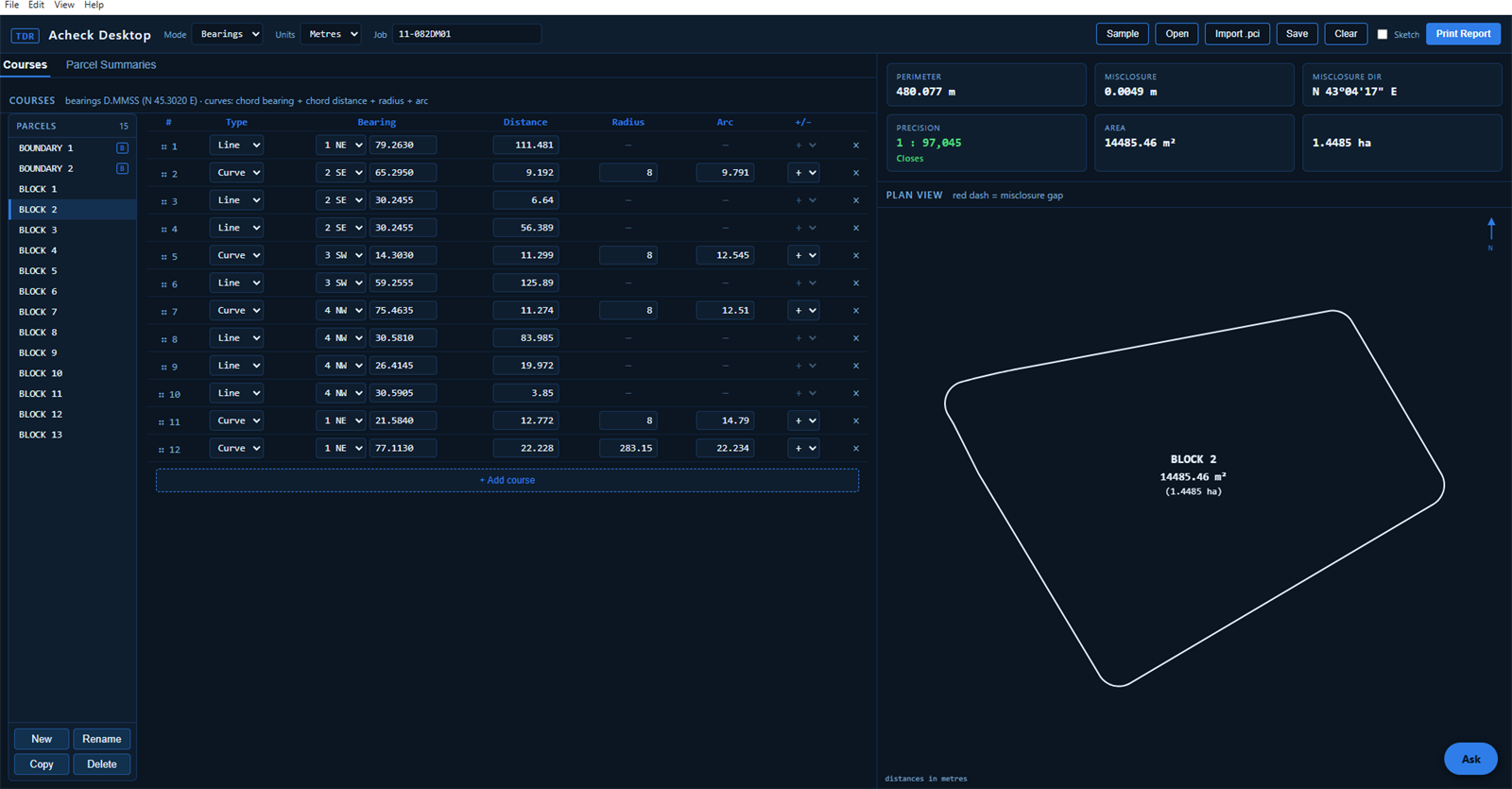
Bearings & Azimuths
One-click toggle between quadrant bearings and whole-circle azimuths, with curve deltas in D.MMSS.
Live Closure Check
Misclosure distance, direction and precision ratio update as you enter courses — catch the typo before it costs you.
Closure Report PDF
Professional, self-contained report: course table with arc, chord and radius on curves, area, and your firm’s letterhead info.
Parcel Summaries
Pick any number of parcels for individual areas plus a total — imperial or metric.
AutoCAD 2023–2027
One install covers AutoCAD and Civil 3D 2023 through 2027, dockable palette editor included.
- Unzip the trial download.
- Copy the
AcheckPalette.bundlefolder into%APPDATA%\Autodesk\ApplicationPlugins. - Restart AutoCAD and type
ACK.
Windows · AutoCAD or Civil 3D 2023–2027 (full versions, not LT) · the trial runs fully offline — no card, no sign-up.
Questions surveyors ask
What are the three editions?
Acheck Desktop + Online — a Windows program plus the browser version, for a PC with no AutoCAD on it. $300 a year, one seat, as many parcels as you like.
Acheck Online credits — the browser version, paid by the check. $15 for 3, $45 for 10, $150 for 40.
I haven’t got AutoCAD. Which one do I buy?
Which AutoCAD and Civil 3D versions does the plugin work with?
Does my drawing or survey data get uploaded anywhere?
Can I try it before I buy?
Can I get a refund?
Not a surveyor — just want to confirm a lot’s area and layout from the plan in your hand? Check one parcel yourself for $5, or have us do it for $45.
Parcel Check for Homebuyers →Who makes it